

A workflow can receive perfectly valid JSON and still get the wrong data. Build a small JavaScript gate that rejects malformed tasks before they reach the next step.
Publication note: This is an AI-assisted demonstration lesson for Learn. The code has a recorded automated test suite; founder editorial review is still pending. All inputs are synthetic examples. No AI service, API key or paid tool is needed.
What you will build
A function called isValidTask(raw) that returns true only when JSON text matches a specific task contract. You will see the original mistake, repair it in the browser, and run the downloadable tests locally. Allow about 20 minutes; this is an estimate, not a measured completion time.
Before you start
- Basic JavaScript: functions, objects, arrays and booleans.
- For the browser exercise: a modern browser with JavaScript enabled. Use sample data only.
- For the optional local run: an existing Node.js installation and a terminal. No packages to install.
- You do not need an AI account. The sample represents text that a model might return; no real model output was evaluated.
Step 1 · Define a contract before writing a prompt
Suppose a workflow turns a request into a task draft. Decide exactly what the next step may receive:
{
  "title": "Review the weekly report",
  "priority": "normal",
  "requiresApproval": true
}- Exactly three fields:
title,priority, andrequiresApproval. Extra or missing fields are rejected. - The trimmed title must be non-empty and at most 120 JavaScript string units long. This is a simple length rule, not a word counter.
- Priority must be exactly
low,normal, orhigh. - Approval must be a JSON boolean:
trueorfalse. A string containing “false” is invalid. - The input must be a string of at most 10,000 JavaScript string units. This bounds this teaching example; it is not a production request-size policy.
Both boolean values are valid data. A model saying requiresApproval: false must never override your own permission or approval rules. This validator does not authorize an action.
Step 2 · Reproduce the mistake
The tempting shortcut below accepts anything that JSON can parse. It checks syntax, but not whether the parsed value is a usable task:
function isValidTask(raw) {
  try { JSON.parse(raw); } catch (error) { return false; }
  return true;
}
For example, [], null, and a task with "requiresApproval": "false" all parse. None matches our contract. JSON.parse constructs the value described by JSON; your contract checks are a separate step.
Step 3 · Fix and run it
Run the starter and read the failing cases. Add the checks from Step 1. Try the Hint first; use Show the fix when you want to compare. The exercise runs in your browser and does not call an AI service. The 12 browser cases omit the large-input case to keep the display readable; the download includes it.
Step 4 · Read the complete solution
function isValidTask(raw) {
  if (typeof raw !== 'string' || raw.length > 10000) return false;
  let task;
  try { task = JSON.parse(raw); } catch (error) { return false; }
  if (task === null || typeof task !== 'object' || Array.isArray(task)) return false;
  const allowed = ['title', 'priority', 'requiresApproval'];
  const keys = Object.keys(task);
  if (keys.length !== 3 || keys.some(key => !allowed.includes(key))) return false;
  if (typeof task.title !== 'string') return false;
  const title = task.title.trim();
  if (title.length === 0 || title.length > 120) return false;
  if (!['low', 'normal', 'high'].includes(task.priority)) return false;
  if (typeof task.requiresApproval !== 'boolean') return false;
  return true;
}
The order matters: reject an unsuitable input, catch a parsing failure, require a non-null object, reject arrays, check exact fields, then check each value. Object.keys supplies the object’s own enumerable string keys for the exact-field check. No type coercion is used.
The title is trimmed only for checking length; the function does not rewrite the input. If your next step needs a normalized object, build a separate parser that returns that object after validation. Do not assume this boolean function returns cleaned data.
Step 5 · Run the downloadable example
Download the complete example and tests (ZIP). Extract it into a new folder. It contains validate-task.js, tests.js, cases.json, and README.txt. Read the source, then run:
node tests.jsExpected final line:
13/13 passedEach PASS means the function returned the expected answer, including correctly rejecting an invalid input. A rejected bad task is a passing test, not a failing validator. The test script exits with a non-zero exit code if a case does not match.
Step 6 · Put the gate in the workflow
Treat these as integration instructions, not a tested integration with n8n, Zapier, or any external service:
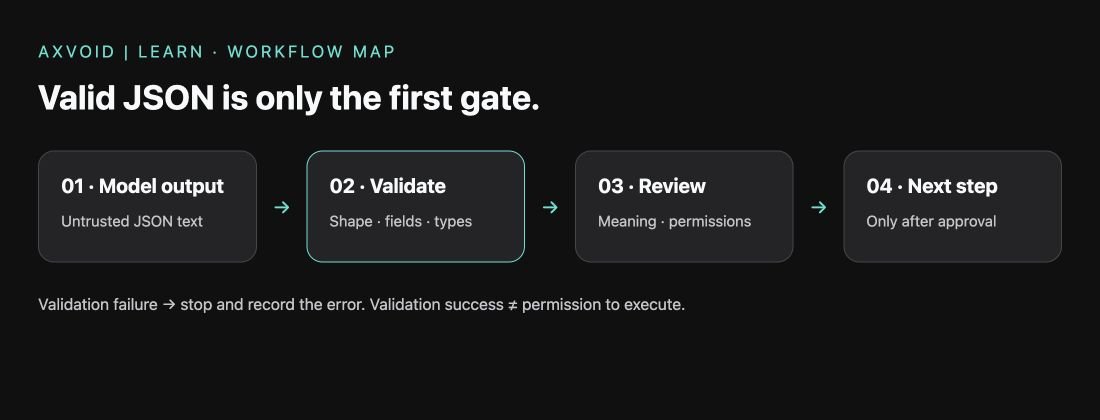
- Receive raw model-output text.
- Call the validator before mapping fields or creating a task.
- If validation fails, stop this branch and record a bounded error; do not silently replace missing data.
- If validation passes, review meaning and apply permission rules owned by the workflow, not by the model.
- Only then pass the draft to an approved next step. Keep credentials and real customer data out of this exercise.
An example prompt may ask: “Return one JSON object with exactly title, priority, and requiresApproval. Use low, normal, or high for priority and a boolean for requiresApproval.” This prompt is illustrative and was not tested against a model. A prompt is not a substitute for the validator.
What went wrong
Valid syntax looked like valid data
The starter rejected broken JSON but accepted the wrong shape. The fix is to encode the contract as checks and test both accepted and rejected inputs.
A string looked like a boolean
Do not repair "false" with Boolean(value): a non-empty string is truthy. Reject the mismatch so you can trace and correct the upstream output.
Passing validation looked like permission
Even a correctly shaped task can contain a false statement or an unsafe request. Validation, factual review, and authorization are different gates.
Test record
- Example version: 1.0 · tested 31 October 2026.
- Local runtime: Node.js v24.22.1. Thirteen fixed synthetic cases passed.
- Cases: valid true/false booleans; broken JSON; null; array; missing field; string boolean; unknown priority; blank title; extra field; overlong title; oversized input; surrounding title whitespace.
- Browser publication check: the starter passed 4 of 12 cases; the complete solution passed all 12. Hint and Show the fix were exercised on the live page.
- No external model, workflow service, task creation, or real-world factual accuracy was tested.
- AI-assisted writing and automated checks; no named human reviewer or founder editorial approval is claimed. Review again by 30 November 2026, or earlier if the example changes.
Known limits
- This is a small hand-written validator for one flat contract, not a general JSON Schema validator.
- It does not detect duplicate JSON member names before parsing, assess truth, detect prompt injection, or decide access rights.
- It does not normalize or return data, retry model requests, connect a workflow service, or store task/progress data in a database.
- The test suite covers the listed cases only. Passing it is not a security certification.
- No video or slides have been produced for this lesson; the available format is Read.
Check your understanding
1. Why can [] pass JSON.parse but fail this lesson’s validator?
2. Why must the string "false" be rejected?
3. Does a valid task with requiresApproval: false permit an action?
Show the answers
1. It is valid JSON, but it is an array rather than the required object. 2. The contract requires a boolean; a non-empty string is truthy and coercion would hide the mismatch. 3. No. The workflow must enforce its own authorization and approval rules independently of model-generated fields.
Your next experiment
Add a rule that rejects titles longer than 80 units instead of 120. Add one accepted boundary case and one rejected case, then rerun the suite. Change both the contract and the implementation; a hidden rule change makes a lesson harder to trust.
Next, explore adding a human approval step. That existing lesson is a draft; its test status is separate from this example.